
How to Use CryptoRank MCP
Share:
 CryptoRank
Share:
Quick Start
MCP Server URL: https://api.cryptorank.io/mcp
The CryptoRank MCP Server gives AI assistants like Claude and ChatGPT direct access to CryptoRank's crypto research datasets — funding rounds, investor profiles, token unlocks, and more. Access requires a CryptoRank account on a PRO API plan or higher.
Choose your setup guide:
-
Connecting to Claude (claude.ai) — browser-based / Claude Desktop, no config files needed
-
Connecting to ChatGPT (chat.openai.com) — browser-based, no config files needed
-
Connecting from Desktop / IDE Clients — for Claude Code, Cursor, Windsurf, and similar tools
Why use CryptoRank MCP?
Traditional APIs require you to write glue code, manage pagination, and normalize JSON before your AI agents can use the data.
With MCP, CryptoRank exposes domain-specific tools like fundraising search, fund intelligence, and vesting schedules that agents can call autonomously from natural language prompts.
This makes it easy to turn a general-purpose model into a crypto-native research, trading, or investment assistant powered by data that is difficult or impossible to scrape elsewhere.
Instead of parsing REST responses, agents call high-level tools to access funding rounds, investor profiles, token unlocks, project teams, and market data in a format that models understand natively.
Key datasets
CryptoRank MCP focuses on unique, research-grade datasets beyond basic prices and tickers.
-
Funding Rounds: ICO/IDO/IEO/private rounds, amounts raised, stages, participants, and dates.
-
Funds & Backers: VC profiles, tiers, strategies, portfolio breakdowns, recent deals, and check sizes.
-
Vesting & Token unlocks: detailed schedules, upcoming unlocks, percentages vs supply/market cap.
-
Project Teams: team composition, notable members, and links.
All of these are exposed as MCP tools so that agents can combine them in a single query, such as "Show AI projects that raised over $10M in 2025 and have major token unlocks next quarter".
Server options
CryptoRank offers a single, authenticated remote MCP server. There is no free keyless tier and no local MCP server.
|
MCP Server Type |
Best for |
Status |
|
Remote Server (Authenticated) |
Production AI agents, serious research, internal tools |
Beta |
All access goes through your existing CryptoRank Public API key, and MCP usage counts against your PRO (or higher) plan limits.
Requirements
What you need depends on how you plan to connect.
Web users (claude.ai / chat.openai.com)
If you're using Claude or ChatGPT in a browser, setup is fully point-and-click — no config files or terminal required.
-
A CryptoRank account with a PRO API plan or higher
-
A compatible subscription:
-
Claude: Pro, Max, Team, or Enterprise plan at claude.ai
-
ChatGPT: Plus, Pro, Business, or Enterprise plan at chat.openai.com
Desktop / IDE users (Claude Desktop, Cursor, Windsurf, etc.)
If you're using a config-file-based MCP client, you'll need:
-
A CryptoRank account with a PRO API plan or higher, and your API key
-
An MCP-compatible desktop client (e.g., Claude Desktop, Cursor, Windsurf, Gemini CLI)
-
Basic familiarity with editing a JSON configuration file (e.g., claude_desktop_config.json)
There is no public, unauthenticated endpoint and no local/offline MCP server distribution.
Connecting to Claude (claude.ai)
Requirements: Claude Pro, Max, Team, or Enterprise plan · CryptoRank PRO API account · Modern browser
This guide walks you through adding the CryptoRank MCP connector to Claude on the web. The whole process takes about 5 minutes.
Step 1 — Open Claude and start a new chat
Go to claude.ai and sign in to your account.
Click New chat to open a fresh conversation.
Step 2 — Open the attachment menu
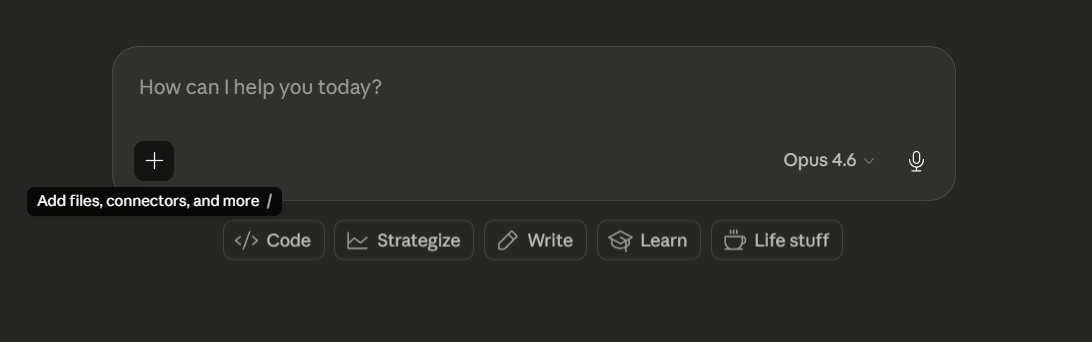
In the chat interface, click the add files, connectors, and more button (the plus icon in the bottom toolbar).
Step 3 — Add a custom connector
In the panel that opens, click Connectors, then Manage Connectors.
Click the plus icon, then click Add custom connector.

Step 4 — Enter the CryptoRank MCP URL
In the URL field, enter: https://api.cryptorank.io/mcp
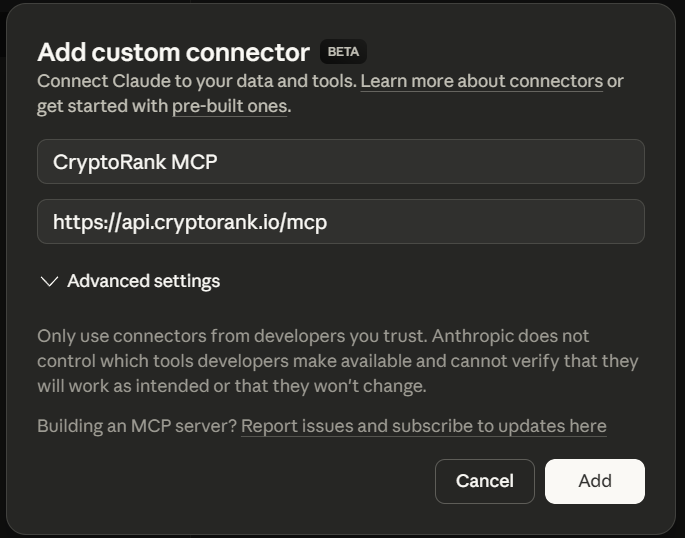
Click Add. An OAuth authorization window for CryptoRank will open.
Step 5 — Authorize via OAuth
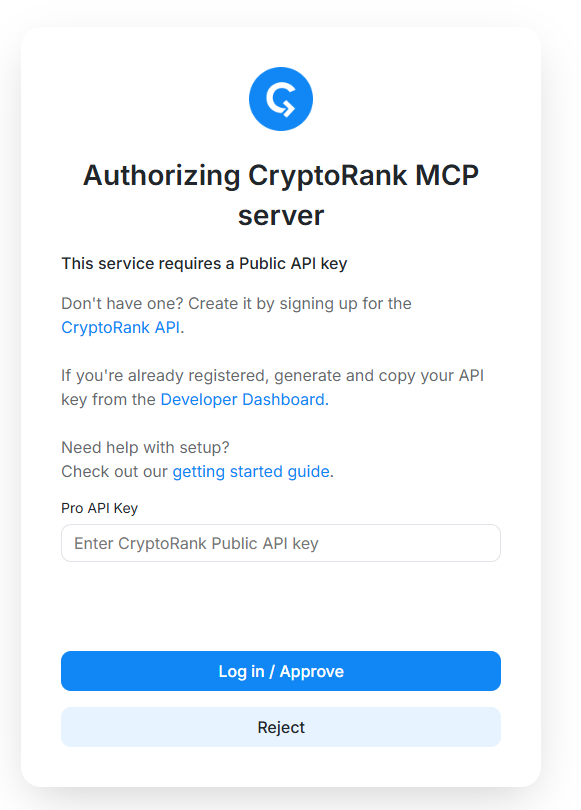
Sign in with your CryptoRank account (the one associated with your PRO API plan) and confirm access when prompted.
Once you approve, you'll be redirected back to Claude and the CryptoRank connector will appear in your connectors list.
Step 6 — Fix the OAuth initialization issue
⚠️ Important — OAuth Initialization Issue
After adding the connector and completing OAuth, the connector may not respond correctly in your first chat. This is a known issue with how the OAuth session initializes.
Fix: Find the CryptoRank connector in your list, toggle it OFF, then toggle it back ON.
After this one-time toggle, the connector works reliably.
Step 7 — Verify the connection
Start a new chat and make sure the CryptoRank connector is enabled (toggle is ON).
Ask Claude:
"What are the latest crypto funding rounds?"
Claude should respond with up-to-date funding data sourced from CryptoRank. ✅
If you see generic or outdated information, try starting a fresh chat — connectors added mid-conversation may not apply retroactively.
Connecting to ChatGPT (chat.openai.com)
Requirements: ChatGPT Plus, Pro, Business, or Enterprise plan · CryptoRank PRO API account · Modern browser (Chrome or Edge recommended)
This guide walks you through adding the CryptoRank MCP connector to ChatGPT on the web. The whole process takes about 5 minutes.
Step 1 — Open ChatGPT
Go to chat.openai.com and sign in to your account.
Step 2 — Open Settings
Click your profile icon in the top-right corner and select Settings.
Step 3 — Enable Developer Mode
In Settings, navigate to Apps, then open Advanced settings.
Toggle Developer mode to ON.
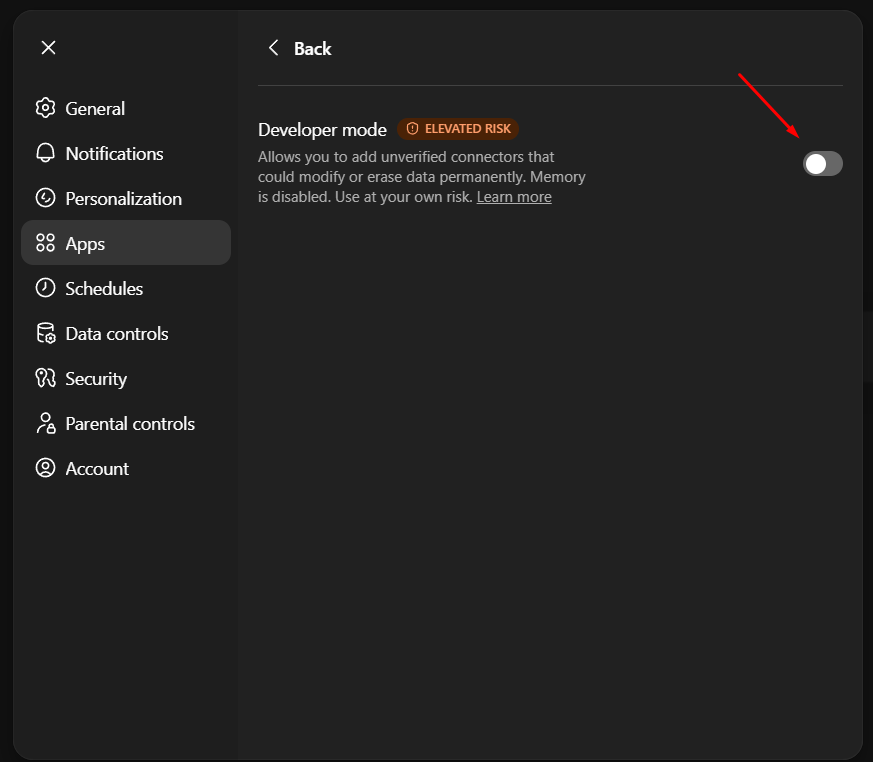
⚠️ Important: Developer mode must remain enabled for MCP connectors to work. Do not turn it off after setup.
Step 4 — Create App
Go back to the Apps section (within Apps & Connectors) and click Create app.
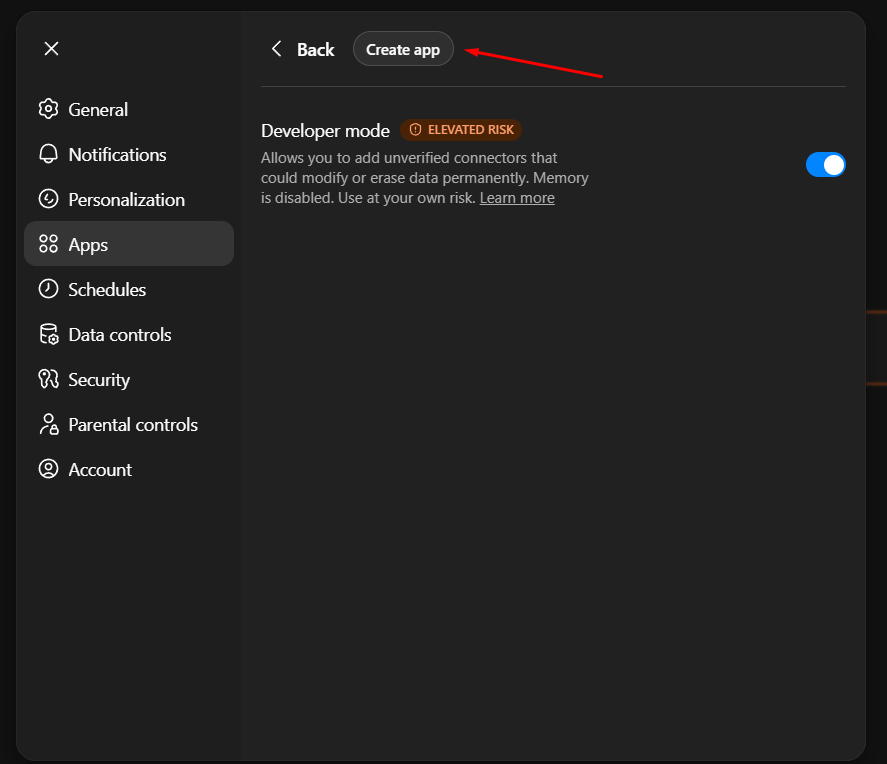
Step 5 — Enter the connector details
Fill in the form:
-
Name: CryptoRank MCP
-
URL: https://api.cryptorank.io/mcp
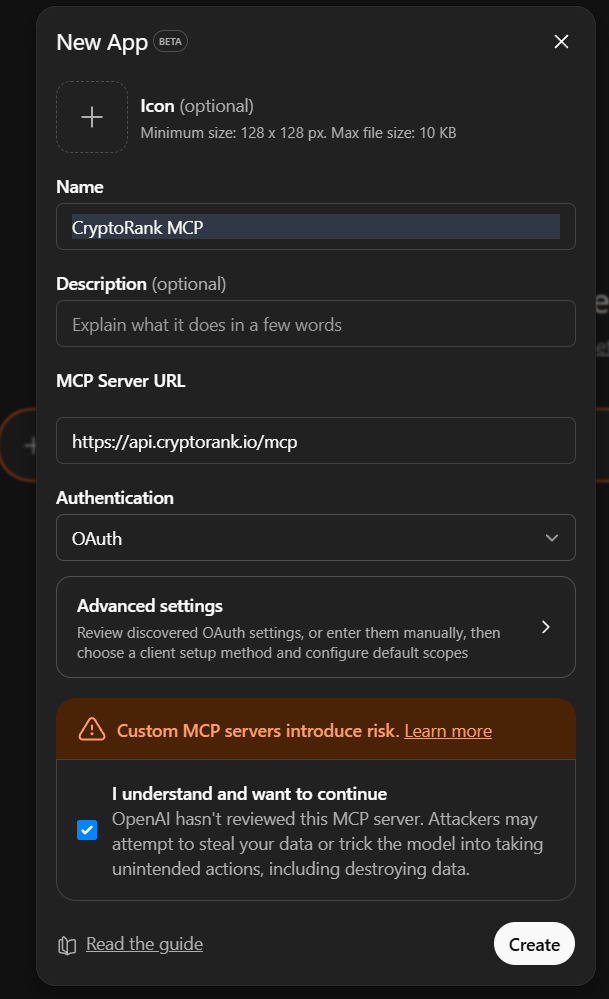
Step 6 — Authorize via OAuth
Click Save (or Add). A CryptoRank OAuth authorization window will open.
Sign in with your CryptoRank account (the one associated with your PRO API plan) and confirm access.
Step 7 — Activate the connector in a chat
Start a new chat. Click the + icon next to the message input field and select CryptoRank from the list of available connectors.

Step 8 — Verify the connection
With the CryptoRank connector active, ask:
"What are the latest crypto funding rounds?"
ChatGPT should respond with up-to-date funding data sourced from CryptoRank. ✅
If you see generic or outdated data, start a new chat and re-select the connector — existing conversations don't pick up newly added connectors automatically.
Connecting from Desktop / IDE Clients
For Claude Desktop, Cursor, Windsurf, and other config-based MCP clients
For web-based clients (claude.ai, chat.openai.com), see the step-by-step guides above.
Most desktop and IDE MCP clients support adding external servers via a JSON configuration file. Below is an example configuration for the CryptoRank remote MCP server using mcp-remote:
|
{ "mcpServers": { "cryptorank_mcp": { "command": "npx", "args": [ "mcp-remote", "https://api.cryptorank.io/mcp" ], "env": { "CRYPTORANK_API_KEY": "YOUR_PRO_API_KEY" } } } } |
Replace YOUR_PRO_API_KEY with your CryptoRank API key. After saving the configuration and restarting your client, the CryptoRank tools will appear automatically and will be invoked by the model when relevant to your queries.
Common config file locations:
|
Client |
Config file path |
|
Claude Desktop (macOS) |
~/Library/Application Support/Claude/claude_desktop_config.json |
|
Claude Desktop (Windows) |
%APPDATA%\Claude\claude_desktop_config.json |
|
Cursor |
.cursor/mcp.json (project) or ~/.cursor/mcp.json (global) |
|
Windsurf |
~/.codeium/windsurf/mcp_config.json |
Sample tools
The exact tool names may evolve, but the CryptoRank MCP Server is designed around focused, high-signal tools similar to market endpoints.
Typical categories include:
-
Project & asset discovery (search by name, symbol, sector, tags, or narratives).
-
Fundraising & rounds (filter by date range, sector, minimum raise, or lead investor).
-
Fund & investor profiles (tier, thesis, portfolio composition, recent deals, geographies).
-
Token unlocks & vesting (upcoming unlocks, historical unlocks, impact metrics).
Tools are designed to return structured, model-friendly objects so that AI agents can generate tables, run comparisons, and chain multiple calls without extra glue code.
Usage examples
Here are sample prompts that an AI agent can answer using CryptoRank MCP tools:
-
"Show all AI projects that raised over 10M USD in 2025, with rounds and lead investors."
-
"List major token unlocks for the next quarter sorted by unlock value and percentage of circulating supply."
-
"Find all investments made by a16z in DeFi projects and summarize their portfolio size and recent exits."
In each case, the agent automatically selects and combines the appropriate tools (fundraising, funds, unlocks, teams, prices) through MCP, instead of you manually stitching multiple REST endpoints together.
Pricing and rate limits
There is no separate pricing for the CryptoRank MCP Server; access is bundled with the PRO and higher tiers of the CryptoRank Public API.
MCP requests consume credits and rate limits from your existing plan, making it easy to upgrade or downgrade without managing a second billing surface.
If you hit rate limits, you can either optimize your agent's tool usage or move to a higher API tier, just as you would for direct REST usage.
Troubleshooting
|
Problem |
Solution |
|
Connector added but AI doesn't use CryptoRank data |
Toggle the connector OFF - ON. This resolves the OAuth initialization issue. Start a new chat after toggling. |
|
"Search and tools" not visible in Claude |
Requires Claude Pro, Max, Team, or Enterprise plan. Try a different browser or clear your cache. |
|
"Connectors" option not visible in ChatGPT |
Enable Developer Mode: Settings - Apps & Connectors - Advanced settings - Developer mode ON. |
|
"Unable to connect" error |
Verify the URL is exactly https://api.cryptorank.io/mcp. Check your internet connection and retry in a few minutes. |
|
"Rate limit exceeded" error |
Verify your CryptoRank API plan is PRO or higher. Wait a few minutes before retrying. Consider upgrading for higher limits. |
|
OAuth popup doesn't appear |
Check your browser's popup blocker and allow popups for claude.ai or chat.openai.com. Try Chrome or Edge. Disable ad blockers temporarily. |
|
Receiving generic or outdated data |
Start a new chat. Connectors added mid-conversation may not apply retroactively. Ask explicitly for "latest" or "current" data. |
|
Connector listed but no tools available |
Your API key may not have PRO access. Verify your plan at cryptorank.io/public-api/pricing. |
Limitations
The CryptoRank MCP Server is a hosted remote service with no free keyless endpoint and no local/offline MCP distribution.
Access to specific tools and datasets may vary slightly by plan and will follow the same entitlement model as the underlying CryptoRank Public API.
Examples of AI-Powered CryptoRank MCP Analysis
The following examples showcase real outputs generated using CryptoRank MCP combined with AI. Each demonstrates how structured on-chain and market data can be transformed into actionable insights, summaries, and analytical content.
1. Major Token Unlocks (Apr 28 – May 4, 2026)
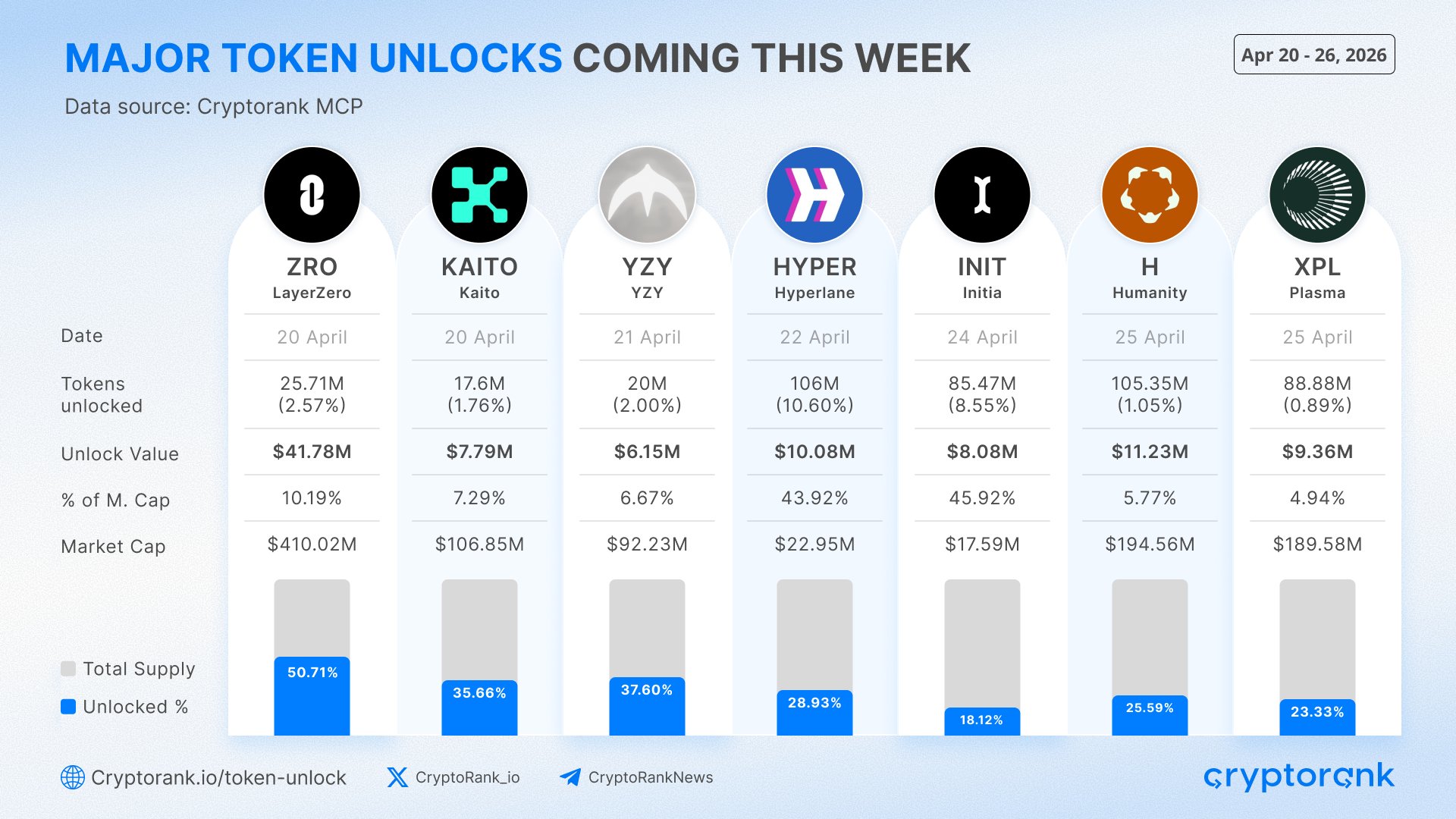
Published Post: https://x.com/CryptoRank_io/status/2046083941539406141?s=20
Data: Token Unlocks
Prompt: Show the largest token unlocks scheduled between Apr 28 and May 4, 2026 by unlock value. Include unlock date, number of unlocked tokens, unlock value in USD, percentage of market cap, market capitalization, and unlocked supply percentage. Present the results as a social media infographic.
2. Futures Exchange Trading Volume
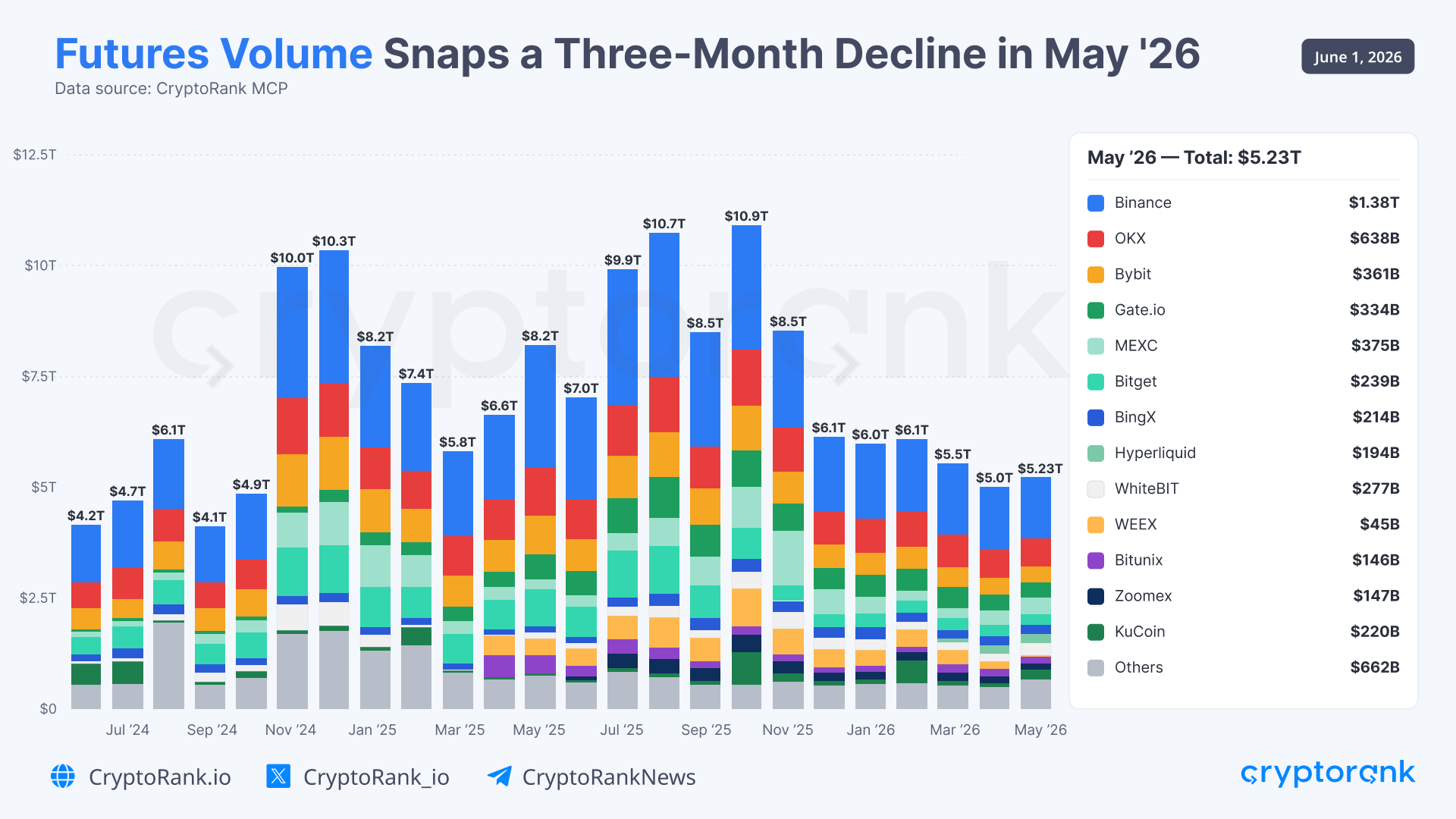
Published Post: https://x.com/CryptoRank_io/status/2061838512752574813
Data: Futures Trading Volume
Prompt: Calculate monthly futures trading volume across the top 12 exchanges from May 2024 to May 2026. Aggregate all remaining exchanges into an "Others" category. Create a stacked bar chart showing monthly volume distribution by exchange and highlight the latest month's total volume and market share breakdown.
3. Notable Funding Rounds of the Past Week (May 2-9)
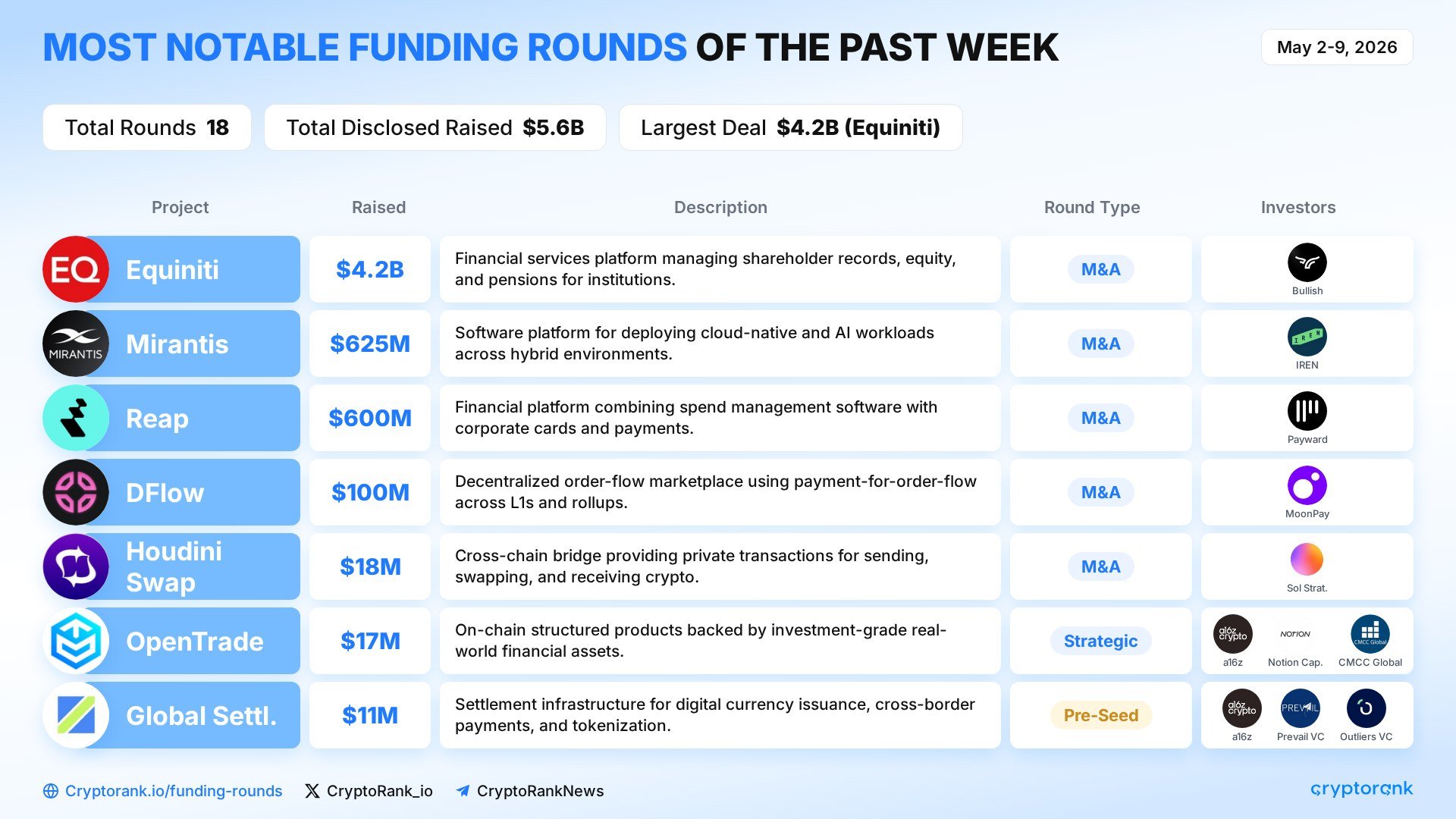
Published Post: https://x.com/CryptoRank_VCs/status/2053528996847943911
Data: Funding Rounds
Prompt: Show the top funding rounds completed between May 17 and May 24, 2026. Rank projects by amount raised and create an infographic displaying funding size, round type, investor participation, and project descriptions.